
Personal Ancestry Writer II v50 (1 Apr 2006)

March 31, 2006 by admin · Leave a Comment 

The April 1st, 2006 update to Personal Ancestry Writer II (PAWriter II) version 50 was posted today. As you may know, PAWriter II is a Genealogy Application that was designed from the ground up to have features similar to the original Personal Ancestral File (PAF) for MacOS (PAW supports MacOS and Mac OS X). This update includes an enhancment to the user interface, and an addtition to the html reports.
Personal Ancestry Writer II

It can be downloaded at lanopalera.net

Changes:
* The picture caption edit dialog box was enhanced.
* The optional inclusion of pictures in html reports was added.
Note: The Reference Guide was updated to reflect these changes.

Coming Up On Apple’s 30th Birthday

March 31, 2006 by admin · Leave a Comment 

In honor of Apple’s 30th Birthday on saturday, April 1st, 2006, CNET put together a little timeline commemorating all of the major events or product milestones over the past thirty years.

Even PC Magazine has a tribute.

Fixed, sorry about the link problem, left out one little symbol.

NewsLetter 2.6

March 30, 2006 by admin · Leave a Comment 

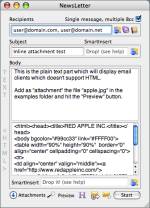
It’s been a while since we mentionedNewsletter, and version 2.6 was released this morning. NewsLetter is, in the words of its developer, a free batch emailer, speciallly thought for newsletters. Its interface is very simple and intuitive, and it features the creation of plain text and HTML messages (simple or multipart), customization of subject and body using “smart tags” and attachments (including inline attachments in HTML messages). You can send the messages immediatelly or save them in MBOX format.

Many of us maintaining contacts with spread out members of the family (i.e. we are the unofficial official contact point for everybody), and this is an easy way to keep in touch, as well as perhaps generate an interest in genealogy from other family members.

NewsLetter

Highlights of Changes Since v2.2
Version 2.6
- Changed email encoding to UTF-8 (read help docs for more info).
- Updated documentation to reflect some important things.
- Built as universal binary.
- Extended filters for Entourage-import-addresses option.
- Added SSL support and override port options (XMail upgrade) –> ie, gmail support.
Read more

Records Manager 2.9.2

March 29, 2006 by admin · Leave a Comment 

John Woodward has updated Records Manager extensively since we last mentioned it. Records Manager is MacOS X software that allows you to collect important records (such as bank statements or receipts) in a database and allow for easy addition of new records, easy access to existing records, and optional automatic backup of the database. Think of it as a replacement for a file cabinet but with easier filing and retrieval. You can optionally encrypt your records with 128-bit AES encryption to keep them secure. It costs $24 and requires Mac OS X 10.2.8.

Some of the changes since it was last mentioned here:
* Added ability to find by contents of notes.
* Reimplemented Find function to support multiple find criteria and to allow finding by modified date and pathname.
* Added “Smart Folders” — continuously-updated folders that contain files matching specified criteria.
* Added folder/file icons to the folder/file window, to allow you to distinguish smart folders from regular folders.
* Added Backup Database command to backup upon demand.
* Added the ability to drag/drop multiple files/folders.
* Added the ability to associate notes with folders as well as files.

Personal Ancestry Writer II v50 (27 Mar 2006)

March 27, 2006 by admin · Leave a Comment 

There is an update to Personal Ancestry Writer II (PAWriter II) version 50 today. This release is mainly concerned with some minor UI changes version 50 (released this past saturday).

Changes:
* Picture captions (if not blank) will now be shown at the bottom of the picture windows.
* The command key to enter or edit a caption is now command-E.
* A picture window now has a little grey square to the bottom and right of the scroll bars which, when clicked, will also enlarge or reduce a scaled picture.
* A Launch URL menu item (command-U) has been added to the notes menu. It will launch your browser if a web or ftp address is selected in the notes window, or it will launch your email program if an email address preceded by mailto: is selected in the notes window.

Next Page »